
Most businesses are running ads, creating content, and driving traffic—but they have no clear idea what’s actually working. That’s where conversion tracking setup becomes the difference between guessing and scaling.
Without proper tracking, you’re making decisions based on incomplete data. You might be spending on campaigns that look good on the surface but don’t generate real results—while ignoring the ones that actually drive revenue.
You’re Running Ads Without Conversion Tracking. Here’s What That’s Actually Costing You.
If you’re spending money on Google Ads, Meta Ads, or LinkedIn Ads without proper conversion tracking in place, you are not running a marketing campaign — you’re making a series of expensive guesses.
This is not a niche technical problem. It’s the single most common issue we encounter when auditing new client accounts at The 6th Avenue. Businesses are spending thousands of dollars per month on paid advertising with no reliable way to know which campaigns, ad groups, keywords, or creatives are actually driving leads, sales, or enquiries. The result is systematic budget waste — often invisible because the ads are still running and some results are happening, just not the ones that are being measured.
What Is Conversion Tracking, and Why Does It Matter?
Conversion tracking is the process of recording a specific action taken by a user after they interact with your ad or marketing content. A conversion can be a purchase, a form submission, a phone call, an email click, a newsletter signup, a PDF download — anything that represents meaningful engagement with your business.
When conversion tracking is set up correctly, your advertising platform knows:
- Which campaigns are generating actual results, not just clicks.
- Which keywords, audiences, and ad creatives are driving the highest quality leads.
- What your true cost per lead or cost per acquisition is.
- Which channels are working together in a customer’s path to conversion.
Without this data, your campaigns cannot be optimised. Google’s Smart Bidding, Meta’s advantage+ campaigns, and LinkedIn’s bid strategies all depend on conversion signal data to improve performance. No tracking data means no intelligent optimisation — your budget is being allocated by guesswork.
The Most Common Conversion Tracking Mistakes in 2026
- Tracking page views as conversions. If your “Thank You” page view is counting as a lead conversion, you’re inflating your conversion count with users who may never have completed your form.
- Duplicate conversions. Multiple tracking tags firing for the same action creates false data and causes algorithms to over-optimise.
- No phone call tracking. If your business generates leads via phone calls, and you’re not tracking calls from ads, you’re missing a major part of your conversion picture.
- Tracking only primary conversions, ignoring micro-conversions. Users who download a resource, watch a video, or spend significant time on your site are valuable signals even if they don’t convert immediately.
- Not using GA4 alongside platform tracking. Platform-native tracking (Google Ads, Meta Pixel) and GA4 serve different purposes. Both are needed for a complete data picture.
What a Proper Conversion Tracking Setup Looks Like
A correctly configured conversion tracking infrastructure for a business running Google Ads, Meta Ads, and organic in 2026 typically includes:
Google Analytics 4 (GA4)
GA4 is your independent measurement layer. It tracks all user behaviour on your website — across all traffic sources — and gives you a platform-agnostic view of what’s happening. GA4 event-based tracking should be configured to capture your key conversion actions.
Google Tag Manager (GTM)
GTM is the deployment mechanism. Rather than hardcoding tracking tags into your website, GTM allows you and your marketing team to deploy and manage all tracking tags (Google Ads, Meta Pixel, LinkedIn Insight Tag, etc.) from a single interface, without touching code for every change.
Google Ads Conversion Actions
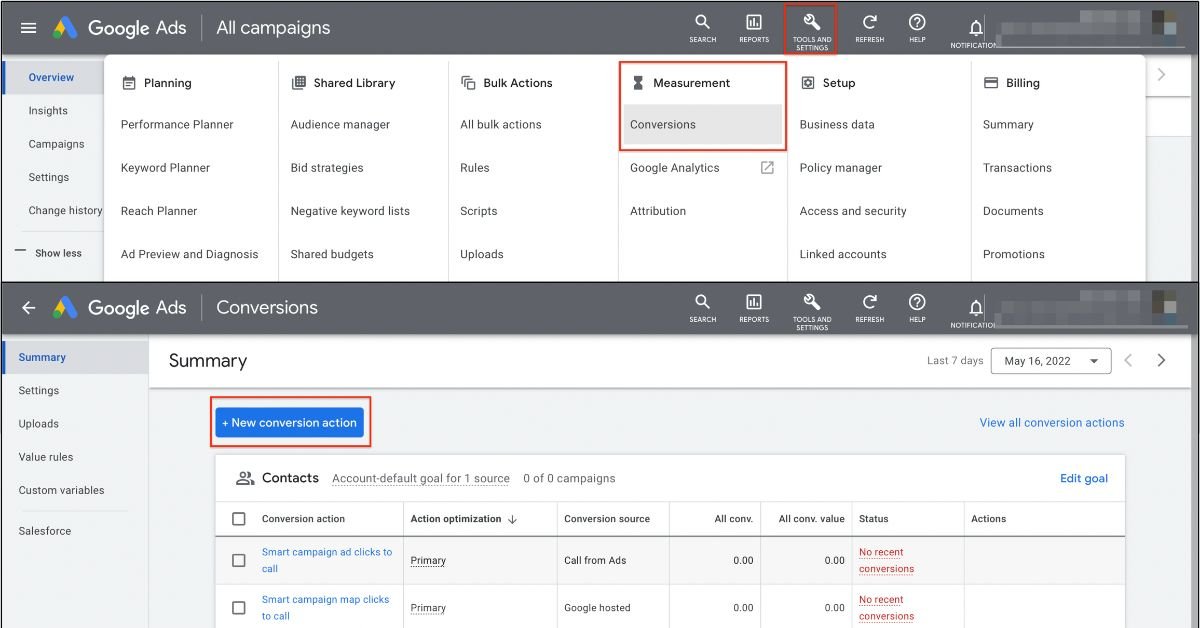
Import your GA4 conversion events into Google Ads, or set up Google Ads-native conversion tracking for specific actions. This is what powers Smart Bidding and campaign-level performance reporting.
Meta Pixel + Conversions API
The Meta Pixel handles browser-side tracking. The Conversions API (CAPI) handles server-side tracking — which is increasingly important for accurate attribution in a post-iOS privacy world. Both should be running simultaneously for best results.
The Business Impact of Getting This Right
When conversion tracking is set up correctly and campaign algorithms have reliable signal data to learn from, most businesses see meaningful performance improvements within 4–8 weeks. Cost per lead typically decreases. Ad spend concentrates on the tactics that are actually working. Decision-making becomes data-driven rather than instinct-based.
In 2026, with ad costs rising across every platform and AI-powered bidding strategies requiring accurate data to function, conversion tracking is not optional infrastructure — it’s the engine your entire marketing investment runs on.
Not sure if your conversion tracking is set up correctly?
The 6th Avenue conducts full tracking audits and implementation for businesses across Canada and the US — GA4, GTM, Google Ads, Meta Pixel, LinkedIn Insight Tag and more.